I am not sure that the work we did with Honeybee-PH would be all that helpful for this, but in case it is of interest:
- In order to get the Thermal Bridge data into WUFI-Passive / PHPP properly, we do have GH components to create and log these model elements in Rhino.
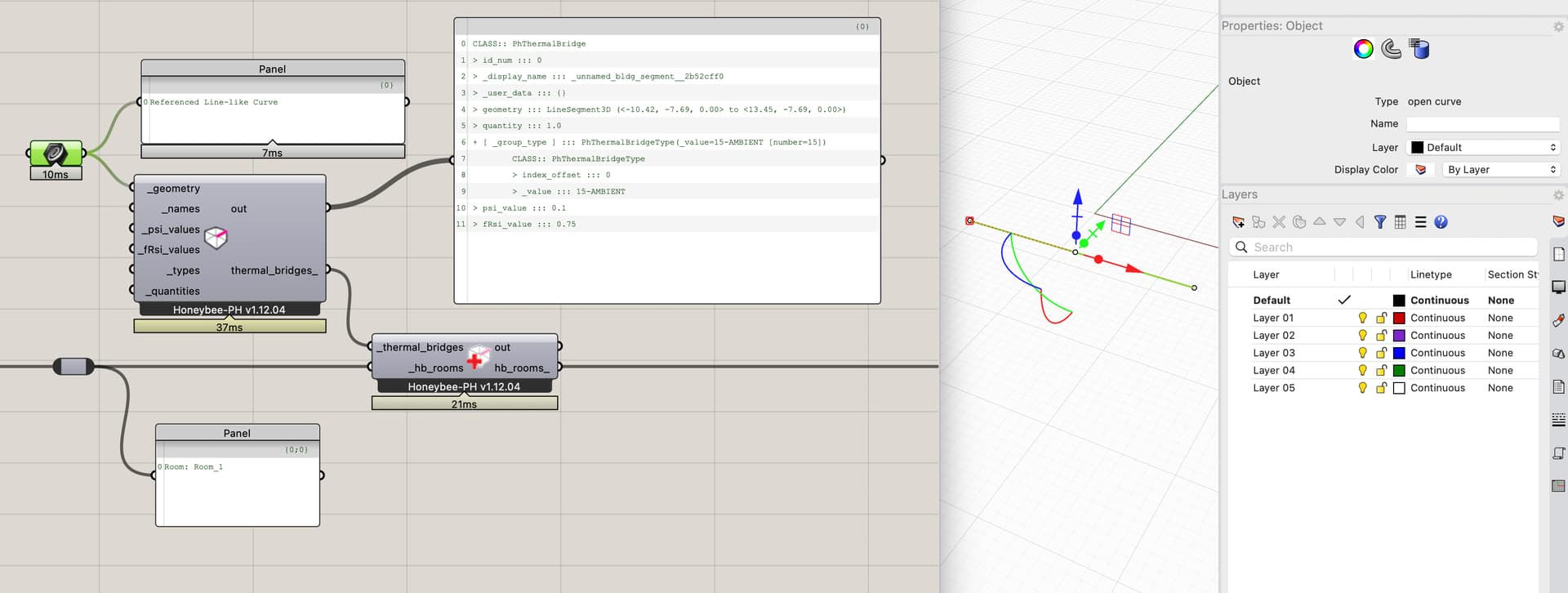
- The honyebee-ph thermal-bridge object is pretty simple - just a container to log:
- ‘type’ (below grade, at-grade, above-grade)
- Psi-Value
- fRsi
- the actual geometry (a Polyline3D representing the length across the facade).
- At export, the TB lengths are calculated, and the relevant values structured for either WUFI-Passive or PHPP.
- FWIW, this has worked well so far and we use it on all our PH projects.
Note a couple things:
- The Psi-Values and fRsi values themselves are calculated outside of Rhino. We use a software named ‘Flixo’ for this.
- Currently the curves are all hand-drawn in the Rhino model and usually ‘tagged’ with a name or ID of some form so we can organize it all properly. I agree that it would super neat to be able to automated the generation of these.
Implementation Thoughts:
- One small nuance we found when implementing, in case it is helpful food for thought for your work, was that it was ambiguous in practice which HB-Room a TB is ‘in’ since by definition they almost always occur at a boundary between two HB-Rooms. We decided to implement the HBPH-TBs as a ‘singleton’ so that no matter what the user does, they can’t accidentally double-count them.
- We have also found that it is super duper important for us to be able to track the ‘source’ of the data, since it comes from outside the model. We use a small HB extension (honeybee-ref) in order to also log all of the reference links to this backup documentation / DB-records where the data comes from.
hope that is helpful. all the best,
@edmay