Is there a way to export only selected rooms with the new Revit Connector? Only a small portion of the level has changed, so I don’t want to export the entire level unnecessarily.
Hi @mdouglass, welcome back! 
Yes. You can do that easily. The plugin only exports the visible rooms. Here is how to do it:
- Select the rooms.
- Then click on the isolate button (or press
ctrl + shift + I). - Now try to export the rooms.
You can use the Unhide command to unhide the rooms. The shortcut is ctrl + shift + H.
Let me know if you have any other questions.
Sorry, wrong terminology.  I want to selectively add rooms to the Pollination model from the Revit model.
I’ve been using the isolate commands heavily in this process as well, so definitely thank you for that feature!
Ah! Now that I re-read your post you mentioned Revit connector. My bad! 
Yes. That is also possible.
- Select the level and create a view in Revit.
- Select the rooms that you would like to import in Revit view.
- Use the “Refresh from Selected Elements” option to refresh the selection.
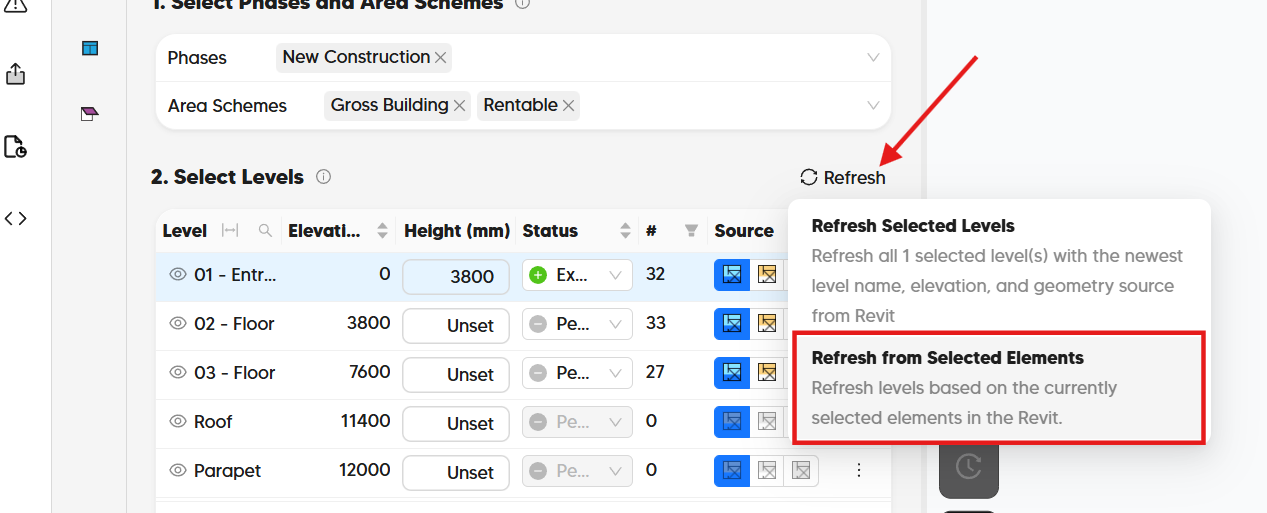
Here is a short recording that shows the process.
Let me know if there is anything else that I can help with.
Sick. Thanks, @mostapha!