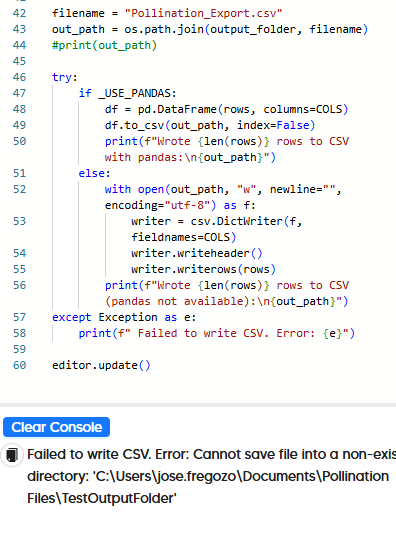
@mostapha, I’m mapping Revit space type parameters to VE thermal templates and zones. I’m trying to use an external file to store a dictionary for the mapped values between Revit, Pollination, and VE. However, I’m unable to write a csv file to a local folder. I’ve tried using pandas and csv, but keep receiving the attached error.
Hi @jfreg,
I love to see more advanced use cases of the script editor. Unfortunately, it is not currently possible to do that since the Python editor runs in an isolated sandbox that is running inside the browser and doesn’t have access to the local drive.
We need to write wrapper methods to allow writing files to a local file using the Model Editor SDK. That is not an easy task to do. Meanwhile, we added the print functionality as a workaround. You can print the data to the console and then copy it to a file. It is not great but it should get the job done until we find a better solution for you.
Here is an example:
Here is the code that I used for the example.
from model_editor import Editor

editor = Editor()
model = editor.model

csv_data = []

# collect the CSV data
for room in model.room_2ds:
    csv_data.append(f'{room.display_name}, {room.identifier}')

# print them out to canvas
print('\n'.join(csv_data))

editor.update()
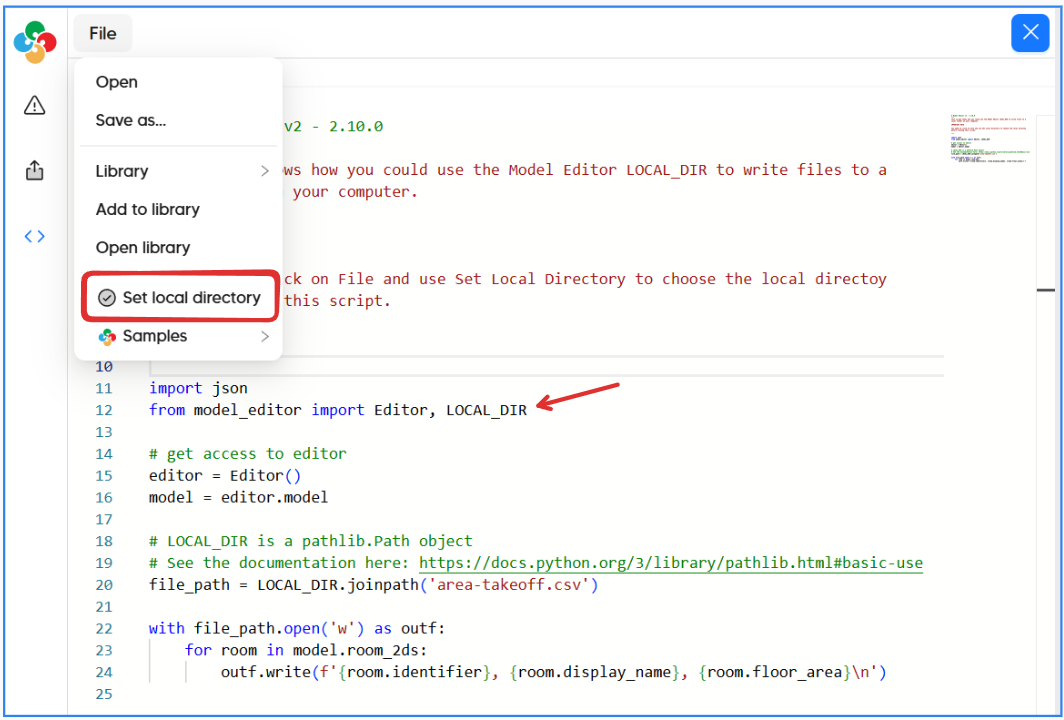
The next official release provides a more elegant way to set a local directory and write the files to it directly by mounting and exposing the folder as LOCAL_DIR.
Give us a week or so to get the release out.
@mostapha thank you so much for working to add this feature! I didn’t expect to have a solution implemented this quickly, so I’m very appreciative that it’s in the works.
Thanks again,