I click the option to open the Model Editor V2 and I have not been able to open it anymore I get this error.
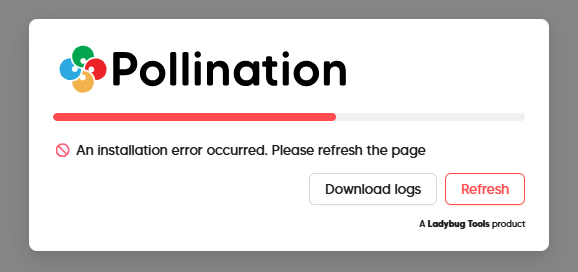
And the Log shows this:
*2025.12.11 11:33:27.265|info|[Create]: DB update
2025.12.11 11:33:28.111|info|[Add]: ModelMetaData success
2025.12.11 11:33:28.112|info|[Add]: SourceModel success
2025.12.11 11:33:28.116|info|[Add]: ScriptParams success
2025.12.11 11:33:28.120|info|[Add]: UserPreferences success
2025.12.11 11:33:28.952|error|[object Object]
2025.12.11 11:33:28.953|error|No model created...
2025.12.11 11:33:29.226|info|[Get]: UserPreferences success
2025.12.11 11:33:29.227|info|[Get]: ScriptParams success
2025.12.11 11:33:29.320|info|Recent POMF loaded...
2025.12.11 11:33:36.636|error| Engine error :(, Traceback (most recent call last):
  File "/lib/python3.13/site-packages/micropip/package_manager.py", line 198, in install
    await transaction.gather_requirements(requirements)
  File "/lib/python3.13/site-packages/micropip/transaction.py", line 75, in gather_requirements
    await asyncio.gather(*requirement_promises)
  File "/lib/python3.13/site-packages/micropip/transaction.py", line 98, in add_requirement
    return await self.add_requirement_inner(Requirement(req))
           ^^^^^^^^^^^^^^^^^^^^^^^^^^^^^^^^^^^^^^^^^^^^^^^^^^
  File "/lib/python3.13/site-packages/micropip/transaction.py", line 211, in add_requirement_inner
    await self._add_requirement_from_package_index(req)
  File "/lib/python3.13/site-packages/micropip/transaction.py", line 289, in _add_requirement_from_package_index
    await self.add_wheel(wheel, req.extras, specifier=str(req.specifier))
  File "/lib/python3.13/site-packages/micropip/transaction.py", line 335, in add_wheel
    await wheel_download_task
  File "/lib/python3.13/site-packages/micropip/wheelinfo.py", line 145, in download
    self._data = await self._fetch_bytes(self.url, fetch_kwargs)
                 ^^^^^^^^^^^^^^^^^^^^^^^^^^^^^^^^^^^^^^^^^^^^^^^
  File "/lib/python3.13/site-packages/micropip/wheelinfo.py", line 209, in _fetch_bytes
    raise e
  File "/lib/python3.13/site-packages/micropip/wheelinfo.py", line 202, in _fetch_bytes
    bytes = await fetch_bytes(url, fetch_kwargs)
            ^^^^^^^^^^^^^^^^^^^^^^^^^^^^^^^^^^^^
  File "/lib/python3.13/site-packages/micropip/_compat/_compat_in_pyodide.py", line 35, in fetch_bytes
    return await (await pyfetch(url, **kwargs)).bytes()
                  ^^^^^^^^^^^^^^^^^^^^^^^^^^^^
  File "/lib/python313.zip/pyodide/http.py", line 458, in pyfetch
    raise AbortError(e) from None
pyodide.http.AbortError: Failed to fetch

2025.12.11 11:36:36.164|info|[Create]: DB success
2025.12.11 11:36:36.529|info|[Add]: ModelMetaData Key already exists in the object store.
2025.12.11 11:36:36.530|info|[Add]: SourceModel Key already exists in the object store.
2025.12.11 11:36:36.531|info|[Add]: ScriptParams Key already exists in the object store.
2025.12.11 11:36:36.531|info|[Add]: UserPreferences Key already exists in the object store.
2025.12.11 11:36:37.283|error|[object Object]
2025.12.11 11:36:37.283|error|No model created...
2025.12.11 11:36:37.365|info|[Get]: UserPreferences success
2025.12.11 11:36:37.437|info|Recent POMF loaded...
2025.12.11 11:36:37.500|info|[Get]: ScriptParams success
2025.12.11 11:36:41.727|error| Engine error :(, Traceback (most recent call last):
  File "/lib/python3.13/site-packages/micropip/package_manager.py", line 198, in install
    await transaction.gather_requirements(requirements)
  File "/lib/python3.13/site-packages/micropip/transaction.py", line 75, in gather_requirements
    await asyncio.gather(*requirement_promises)
  File "/lib/python3.13/site-packages/micropip/transaction.py", line 98, in add_requirement
    return await self.add_requirement_inner(Requirement(req))
           ^^^^^^^^^^^^^^^^^^^^^^^^^^^^^^^^^^^^^^^^^^^^^^^^^^
  File "/lib/python3.13/site-packages/micropip/transaction.py", line 211, in add_requirement_inner
    await self._add_requirement_from_package_index(req)
  File "/lib/python3.13/site-packages/micropip/transaction.py", line 289, in _add_requirement_from_package_index
    await self.add_wheel(wheel, req.extras, specifier=str(req.specifier))
  File "/lib/python3.13/site-packages/micropip/transaction.py", line 335, in add_wheel
    await wheel_download_task
  File "/lib/python3.13/site-packages/micropip/wheelinfo.py", line 145, in download
    self._data = await self._fetch_bytes(self.url, fetch_kwargs)
                 ^^^^^^^^^^^^^^^^^^^^^^^^^^^^^^^^^^^^^^^^^^^^^^^
  File "/lib/python3.13/site-packages/micropip/wheelinfo.py", line 209, in _fetch_bytes
    raise e
  File "/lib/python3.13/site-packages/micropip/wheelinfo.py", line 202, in _fetch_bytes
    bytes = await fetch_bytes(url, fetch_kwargs)
            ^^^^^^^^^^^^^^^^^^^^^^^^^^^^^^^^^^^^
  File "/lib/python3.13/site-packages/micropip/_compat/_compat_in_pyodide.py", line 35, in fetch_bytes
    return await (await pyfetch(url, **kwargs)).bytes()
                  ^^^^^^^^^^^^^^^^^^^^^^^^^^^^
  File "/lib/python313.zip/pyodide/http.py", line 458, in pyfetch
    raise AbortError(e) from None
pyodide.http.AbortError: Failed to fetch