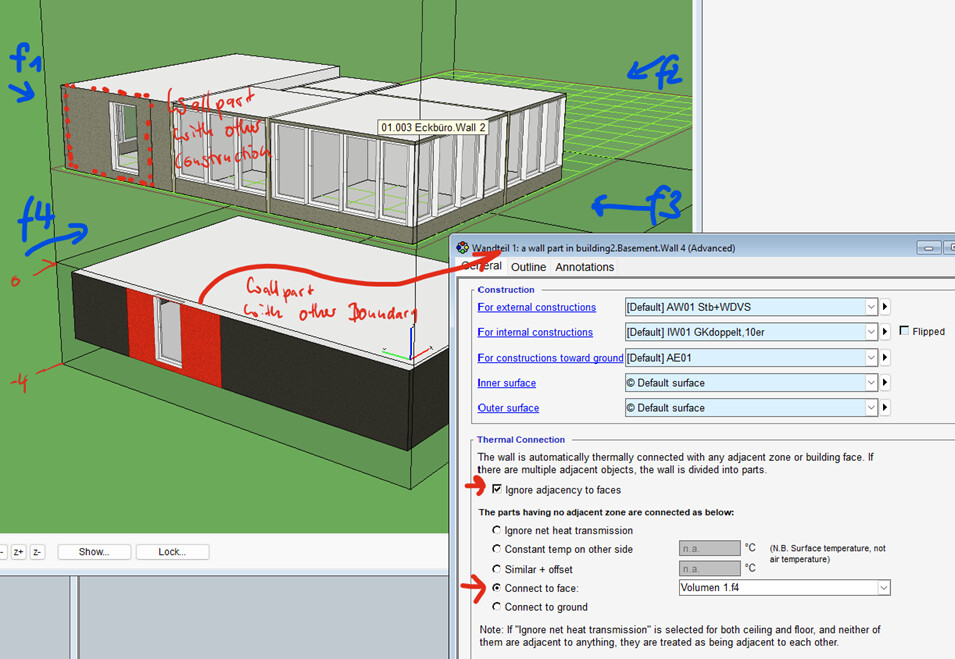
i’d like to try to add the export of the construction names and maybe the subsurfaces to the ida dump.
Right now, my main problem is setting up a production development environment. Do you have any tips on how I can modify the Python code of the modules in Visual Studio and then test it in Grasshopper (in conjunction with the other Honeybee libraries)?
Can you tell me what do you mean here by Python? Is it trying to do this in the Grasshopper itself or the HBJSON → IDM? If it is the second one we are in the process of adding this functionality to the IDM exporter.
We have already made an improvement to export the zone property and constructions and program types are next on the list. What is the scope of what you’re trying to do?
I’m adding @davi and @anon28802460 who are helping us with understanding the IDA ICE requirements.
If you have an IDM example with a subface, we should be able to add support for it to the existing workflow.
i’d tried to modify your honeybee_idaice/writer.py but wasn‘t able to get a proper production development environment where I can modify the python code and test it directly in grasshopper.
My goal is to add subsurfaces to distinguish between different constructions and to assign different boundary conditions e.g. for surfaces below ground level:
It has been a long time since I have used Grasshopper for development. I suspect you need to use the Python 3 editor for this library but I’m not sure. @chriswmackey or @mikkel should be able to better help you with this question.
My suggestion is to save the model as an HBJSON, and then set up your Python development externally. That way you can do the development without being concerned about Grasshopper.
If you share an HBJSON of the model that you’re trying to export with me, I will also have a look. We do several geometry simplification in the process that makes it hard to export the wall segments but I can think of some workarounds to get it work for cleaner models like yours.
There are a few ways to do this but, if you don’t particularly need the 3D visualization that Rhino gives you, then I would follow @mostapha 's suggestion here:
Then, you can run the model translation similar to how the honeybee-idaice tests run. Like in this sample:
I made some changes in the code so that different constructions can be exported (only by names, without layers). I changed the export of windows and doors to take their type into account. Therefore for each window and door type a ressource is created and the element assigned to it.
This should make it easier to continue working with large models in IDA.
Hope you can merge the changes back in…
I saw the PR. Thank you so much. The tests are currently failing, and there are some folders that should have not probably been included in the PR. How comfortable are you with making changes to a PR using Git command? Would you like me or @chriswmackey to comment on the PR for you? Or do you prefer us pushing the fixes as necessary? Let me know and we can continue the conversation on GitHub.