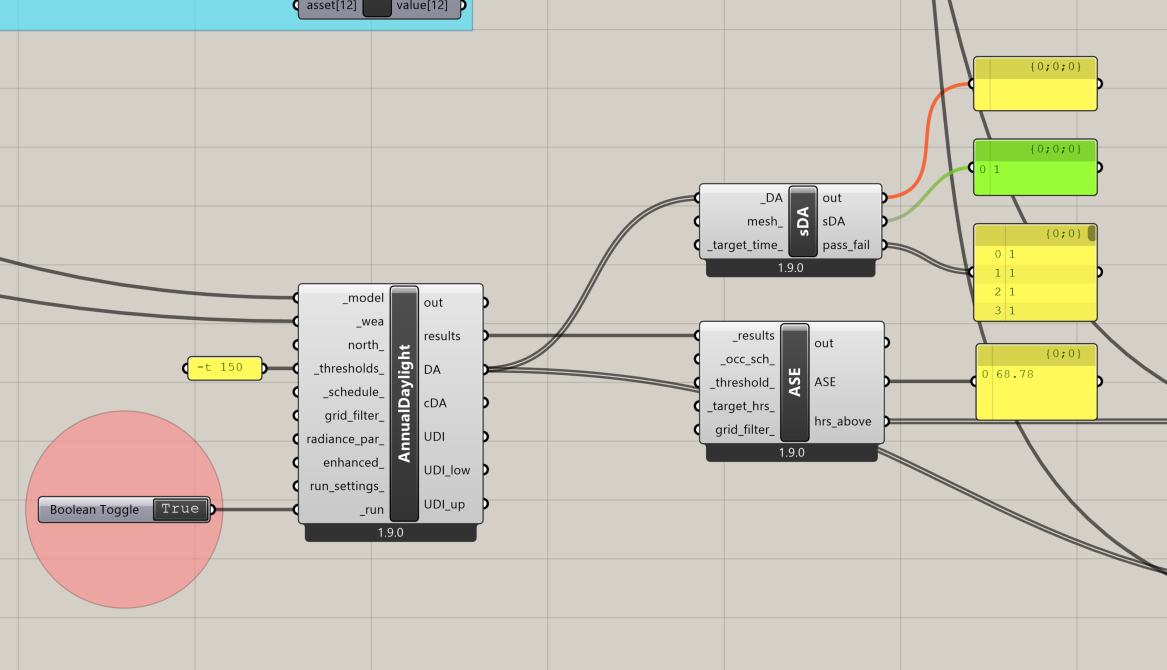
I’m trying to calculate the sDA percentage of a simple shoebox analysis, but in the sDA panel I only get values of 0 or 1 as results. Is this expected behavior, or should I be seeing percentages instead?
The sDA component returns the sDA as decimal numbers, so when you get 0 or 1 it is actually 0% and 100%. This is not really similar to how the other metrics are presented (DA, cDA, UDI, ASE). We should probably change the component so it returns a percentage rather than a decimal.
Is there anything I can do at the moment to visualize the actual decimal results I’m getting, or do I need to wait for the next Ladybug update to be able to see them?
I have updated the component and you should able to get the changes by running LB Versioner within an hour (you need to replace the component on your canvas).
If you don’t want to wait you can just multiply the results by 100 with the native multiplication Grasshopper component.