Hi, I’m currently working on a project with multiple repeated floors and would like to better understand how the multiplier function works in the Rhino plugin.
I’ve set up my model using multipliers to represent six repeated floors. However, I’m concerned about how the software assigns surface boundary conditions. From my understanding, surfaces are automatically classified as either outdoor or interior depending on whether adjacent geometry (e.g., walls or floors) is detected.
In the case of using multipliers, will the software correctly interpret adjacency between repeated floors? Or do I need to manually adjust the boundary conditions—for example, changing floor/ceiling surfaces from “outdoor” to “interior”?
This is particularly relevant because I plan to model an additional floor above (e.g., the 7th floor) separately. At the moment, without explicit geometry above, some surfaces are being identified as “outdoor,” which is not accurate.
I hope my situation is clear, and I would appreciate any guidance on best practices for handling this.
This is not how the Rhino plugin works. All the faces are set to outdoor unless you run the PO_SolveAdjacency command.
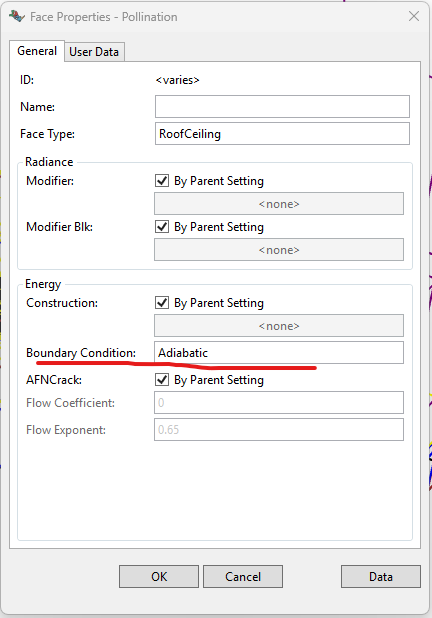
@chriswmackey will correct me but my understanding is that you should set the floor and ceiling faces as adiabatic to ensure there is no heat transfer from them. This basically means that because the floors above and below are the same there is no heat transfer between them.
You may want to check the EnergyPlus tips and tricks document. It has a section for using multipliers.
Yes, that’s the recommended way to do it. You basically assume that the repeated floors all have rooms at the same temperature - so no heat flow between rooms or adiabatic boundary conditions.
You can do this in the Rhino plugin by selecting the relevant faces (using something like PO_SelRoomFaces to select just the floors or roofs). Then you do PO_EditFaceProperties and change all of the boundary conditions to Adiabatic: