hi @chriswmackey we are trying to trouble shoot some problems with our LB installation on our machines. We have started using the free single click installers. We need a way to tell what version of LB GH Plugin is installed with which Pollination installer. Is there a table somewhere? Because the .exe version #s do not correspond to the GH version. For eg:
V1.9 (Latest GH Plugin) Single Click Installer version is 1.66.13
What version of the GH Plugin is installed with single click installer v1.56.1? We are assuming it is v1.8, but when we install it, it does not show up in GH.
We currently don’t have such a thing. Our approach has been to try to keep everyone on the latest versions of the plugin. The installer version is for the Rhino/Grasshopper installer version and not the Ladybug Tools.
We keep the major version for Ladybug Tools the same and only change them when we have a major release.
Can you help me better understand your use case? Do you have scripts that are tied to older version of the LBT plugins? Is there a reason that you can’t update them to the newer version? We have some automated update functionality built into Grasshopper, and we rarely make any major changes to the components at this point.
Hi @mostapha our issue is not about updating them to new versions - we are actively doing that. Our issue is that our IT would just like to know if they look at the installer and the single click installer says “v1.56.1” then what version of the grasshopper plugin is shipped with that installer, so we can better keep track of what versions are installed.
We currently don’t have a good way to do this. The general rule is any version of the Pollination installer that is released after a major release of the LBT Grasshopper plugins includes the latest iteration of that version with all the new development and fixes until we create a new major release of the LBT Grasshopper.
For example, all the releases after Jul 2025 when we made the 1.9.0 release are coming with LBT 1.9. We will release version 1.10 in the next week or so and at that point the Grasshopper installer will include the LBT 1.10 going forward.
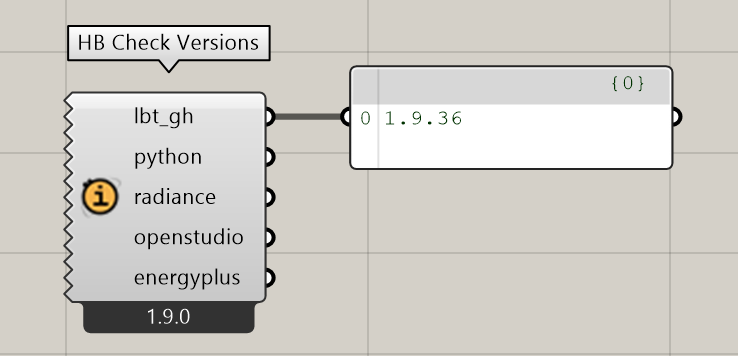
I know that @mostapha mostly answered your question that we do not currently have a table that links versions of the Pollination installers to versions of LBT-Grasshopper. Granted, if you have run a pollination single-click installer, you can always drop the HB Check Versions component on your canvas to see the exact version of LBT-Grasshopper that you have installed:
As @mostapha said, we usually don’t make big changes to the LBT-Grasshopper components these days but the minor release number in the screenshot above means that we’ve made 36 updates to the components since the LBT 1.9 release 7 months ago. I can check the logs but I bet most of those were probably the addition of the Fairyfly THERM components and Mikkel’s new components for electric lighting, GPU processing, etc. If I make changes to components these days, it’s usually to fix edge-case bugs or update docstrings.
In any event, making a table to track every minor release of LBT-Grasshopper as it relates to the pollination installers takes some effort. It would be a big table and it probably requires some automated approach of parsing dates on the GitHub Releases of LBT-Grasshopper. What I could do much more easily is a table that links only the major release number of LBT-Grasshopper (eg. 1.8, 1.9) to the version of the Pollination Grasshopper installer that first shipped with it. So this would allow you to figure out the major release number of LBT-Grasshopper given the version of pollination installer that you have.
If this would satisfy the concern of your IT department, let me know and I can try to add a table to our Compatibility Matrix for this.
Hi guys,
Sorry for the delay in responses, I got too caught up having fun with fairyfly and dealing with work this week
Anyway, it sounds like this might be a bit complicated, I think it is OK. The motivation was because our IT department had many installers for LB or Pollination (since the single click installers came out) and they were getting mighty confused over what versions of the plugins were in each installer, and despite my best effort at telling them, because I am the one saving the installers and remember, they do not always believe me, and wanted some documentation from the source.
This however might be a problem of the past though, since in our effort to upgrade everything from legacy and get on one version of LB in the office, I am making an executive decision and am removing all the old installers and going to just keep the latest in the folder as I see it released from you guys, so there should not be a question. That said, @chriswmackey your suggestion here:
I think would be beneficial in case this question ever comes up in the future again, and I can point them to it. The compatibility matrix is already super helpful.
Thanks for that plugin screenshot too - did not know that was there, helpful as well. Seems some peoples’ computer images are older than others and so this will be helpful understanding what they really have when we have an issue.