Been a while since I’ve last used Ladybug tools. Lot’s of Phius work here in New England which unfortunately got me tied to other modeling tools for the past 3-4 years.
Now I’m trying to get up-to-date on Pollination / Ladybug (through Rhino Grasshopper), and I’ve come across a few questions:
Are the PO Schedule, PO Room, etc. Grasshopper components exclusive to Pollination Rhino? I’ve tried using it on Grasshopper (and right clicking to get that window that lets me easily adjust schedules), but I’m getting a warning saying that to run PO_LiceneManager.
Is the ability to ‘Pollinate’ through the cloud exclusive to the paid tiers? Also got an error when trying to run online. I just tried running my my first model locally on my PC, but I guess there are still some errors on the model as there were no results. I’ll try again in a moment.
When running locally, should the ‘check study status’ and ‘check run results’ work by just connecting them to the ‘pollinate’ component?
Now more specific Pollination recipe questions:
I’m doing this analysis for a change-of-use (commercial to mixed-use residential) of a historical building. Is there a way to prevent the Appendix G recipe from changing my envelope assemblies to the baseline R-values?
The Appendix G Performance recipe requires a building type as one of the inputs. Does this overwrites the program, schedules, etc. of each use thermal zone? E.g., the majority of the building is residential, but on the GF we do have a few retail/commercial spaces.
Terrific work you all have done with this tool! Lots of improvements to what I already considered the best dynamic energy modeling tool.
Hi @vitorleiteg, good to see you back and welcome to the Pollination forum.
See my responses below, and let me know if you have any other questions.
We should make our support for PH official so you could also use it for your projects! We have been waiting to finish full support for program types and constructions which is almost done.
Yes. They are part of the Pollination Rhino plugin.
We don’t offer cloud simulation anymore. You can change it to run the studies locally, however. This video covers different ways that you can run simulations using the Pollination model:
Yes. They should. Are you facing any issues for running your studies locally?
This and your next question about the recipe are questions for @chriswmackey. I will assign the topic to him so he can help you for your questions.
Thank you so much for the kind words. Since some of the available online documents are outdated and you might not have seen the latest announcements, we are slowly but surely phasing out the simulation part out of Pollination and focusing on everything before and after running the simulation. That includes all the steps involved preparing your simulation model such as geometry, program types, thermal zones, constructions, etc.
We already started migrating most of the Pollination recipes to Ladybug Tools. See here:
Thank you and let me know if you have any follow up questions.
Yeah, the ‘check study status component’ is not working, but it seems it is due my proposed model failing to complete the simulation. Something is going wrong when sizing the DOAS + VRF system. I’ll try to debug and if I can’t find a solution today, I’ll open another forum post asking for help tomorrow.
Don’t want to flood this post with topics that are not pollination related.
Thanks! That’s the right way to do it. Also, see here for a similar discussion. Unfortunately, for some reason the images don’t load correctly but you can see the text.
If I am being honest with myself, the Appendix G recipe is in need of some revisions for its results to be realistic. For one, this is a known limitation:
The recipe is really only written to work with new construction and I did not add in a option to keep all of the existing constructions for existing buildings. So this option should be added at some point.
Another major limitation that I think needs to be addressed at some point is that the recipe relies on OpenStudio-Standards routines to set the efficiencies of all the baseline HVAC equipment based on the autosized values for each piece of equipment. This efficiency-setting part of the OpenStudio-Standards routine works pretty well but, in the process, OpenStudio-Standards applies some heavy-handed availability schedules to the whole HVAC system based on “hours of operation” that it decides based on the building type and are not exposed as inputs. In addition to not having “hours of operation” exposed, I have come to realize that using HVAC availability schedules like this is often not realistic nor is it required for the model to represent a valid Appendix G baseline building. And, as you can imagine, eliminating all heating, cooling, fan and pump energy for all unoccupied hours has a significant impact on the baseline EUI, sometimes reducing it by 30-40%.
Real buildings tend not to completely shut off the entire HVAC when the building is unoccupied (as the openstudio-standards availability schedule implies) because there’s often a major risk of property damage from pipes freezing, condensation happening, or rooms becoming as hot as a car in the sun, meaning some sensitive objects inside can be damaged. What really happens to conserve energy during unoccupied hours is that the thermostat gets set back and the outdoor air controller gets turned off given there are no occupants for which ventilation is needed. So maybe a revised Appendix G recipe should do something like this instead of a heavy-handed availably schedule but, whatever the case, both the baseline model and the proposed model in the recipe should be using the same strategy to account for the same unoccupied hours, which is not what happens right now in the recipe. The result is that the baseline building EUI in the recipe currently ends up looking much lower than it actually should be, meaning that you will almost always get more LEED points with a professional Appendix G modeler’s workflow than what the recipe currently tells you.
Needless to say, if we end up exposing the Appendix G recipe in Ladybug Tools at some point similar to how we exposed the daylight compliance recipes, I’ll take it as an opportunity to address these limitations. But, until then, you can take the results of the recipe with a grain of salt knowing that your real building is almost certainly doing better than what the recipe tells you.
To answer this question:
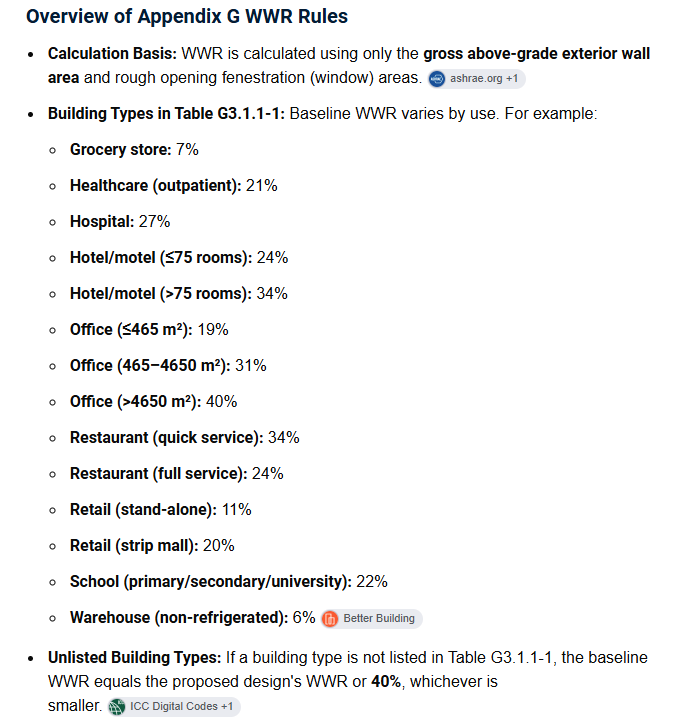
No, none of the programs of the schedules for internal loads are overwritten using the building type. The building type currently gets used to set the hours of operation for the (unrealistic) availability schedules in the baseline HVAC as mentioned above. It also gets used to set things like the WWR of the baseline building according to Table G3.1.1-1:
Thank you, @chriswmackey! It’s always helpful to understand the limitations of the recipe.
Does this mean the OpenStudio measure to set the LEED baseline has the same limitations as this recipe?
At the end of the day, this isn’t getting submitted to USGBC; it’s basically just a learning exercise for myself, so being somewhat inaccurate on the number of points isn’t a big deal. I’m just trying to get some results first .
Hopefully you and the Pollination team have some bandwidth to gradually update this Appendix G recipe sometime in the near future. I feel like recipes like this (alongside the many others you’ve already released) and 3D modeling integration (we already have Rhino and Revit; hopefully SketchUp one day!) are really important for getting new people to use this software.
 Hi
Hi 
 .
.