Dear  Pollinators,
Hope you are enjoying the start of summer (or winter, depending on where you live!). It’s been about three months since our last Revit plugin update, so it’s time for a fresh release and a recap of what we’ve been building.
TL;DR
- Retiring Classic: We are retiring Pollination Revit Classic.
- New Features: We’ve added a bunch of new features. Most notably, the ability to copy rooms from linked models and automatically return idle licenses to the pool. Check out the full feature list below.
- TRACE 700 Export Upgrade: We’re working on an improved TRACE 700 exporter that exports not only geometry, but also constructions, loads, etc.
What’s New
Over the last three months, following our announcement of the new Revit plugin, we’ve taught two in-person workshops, presented several demos, gathered tons of feedback, squashed bugs, and introduced several new features. Based on user feedback and real-world testing, we feel confident it’s time to officially say goodbye to the Classic plugin.
Because of this, the latest installer no longer includes Pollination Revit Classic. We’ve shifted 100% of our focus to the new architecture and build out the next wave of features on top of this new stronger foundation.
You can download the latest version from the Pollination website. If you haven’t made the transition yet, check out our initial announcement for helpful guides and resources.
With that out of the way, here are the most important features added over the last three months:
New Utility: Copy Rooms from Linked Models
This has been a top request from teams working on large projects where rooms are split across multiple Revit files.
Due to a bug in the Revit API, we couldn’t load rooms directly from linked models the same way we do with roofs, windows, doors, and shades. Instead, we built the next best solution: a new utility that lets you copy rooms from linked models directly into your host model.
Once the rooms are copied over, you can export them seamlessly using the standard Pollination workflow.
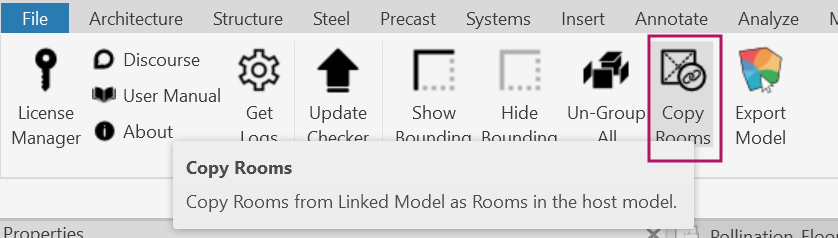
Shout-out to @rileyrenner for suggesting this workaround!
Automated Idle License Return
Most of you share a license pool with your colleagues. If you’ve ever forgotten to return a license after finishing a task or had to track down an organization owner to manually release one you know the headache.
That won’t happen anymore. The latest Revit plugin update tracks inactivity and automatically returns idle licenses back to the pool.
By default, the timeout is set to 1 hour, but you can adjust it to 4 hours, 8 hours, 24 hours, or Never under Settings > License Timeout.
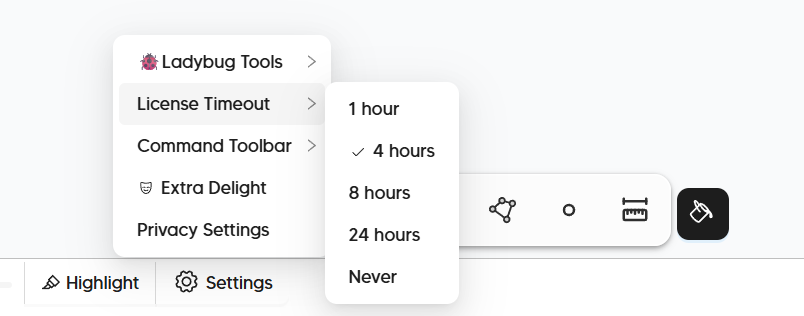
To make sure you aren’t interrupted mid-task, a notification pops up 10 minutes before the license is returned so you can easily extend your session if you’re still working. We also saved the latest version of your model before returning the license to ensure you won’t lose any of your work.
Improved Boundary Condition Menu
The boundary condition menu used to consist of four separate options: Top Exposed, Ground Contact, Has Ceiling, and Has Floor. Most of you likely only used Top Exposed and weren’t quite sure what the rest were for ¯\_(ツ)_/¯.
We’ve consolidated those options into two intuitive dropdown menus that are much easier to understand and apply.
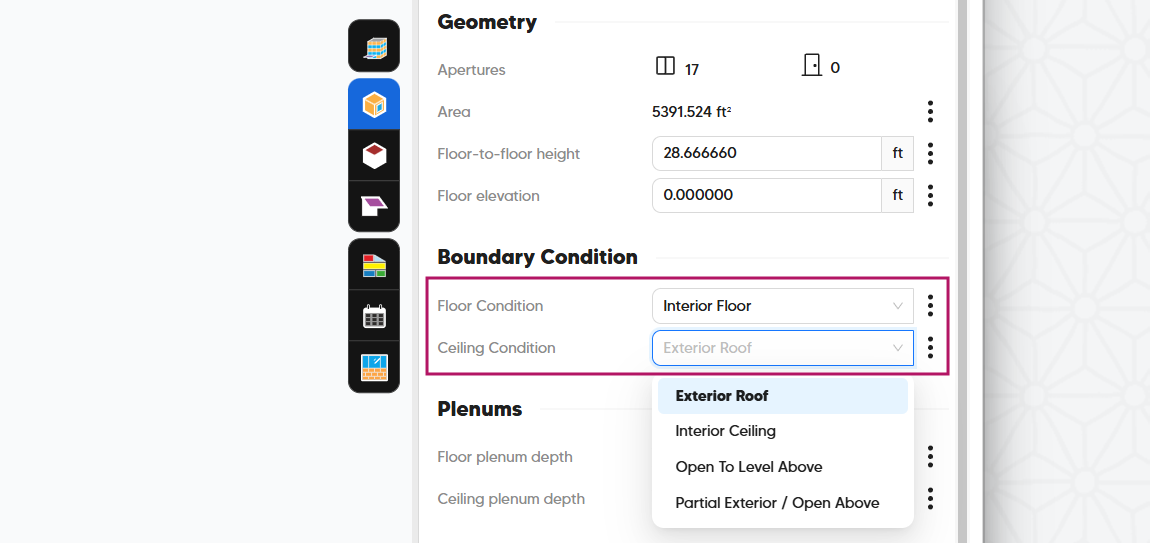
We’ll record a separate video explaining each option in more detail, but in the meantime, here is a quick reference mapping the old settings to the new dropdown values:
Ceiling Condition
| UI Dropdown Value | Top Exposed | Has Ceiling |
|---|---|---|
| Interior Ceiling | No | Yes |
| Exterior Roof | Yes | Yes |
| Open to Level Above | No | No |
| Partial Exterior / Open Above | Yes | No |
Floor Condition
| UI Dropdown Value | Ground Contact | Has Floor |
|---|---|---|
| Ground Contact | Yes | Yes |
| Interior Floor | No | Yes |
| Open to Level Below | No | No |
| Partial Ground / Open Below | Yes | No |
Export Models Directly to epJSON
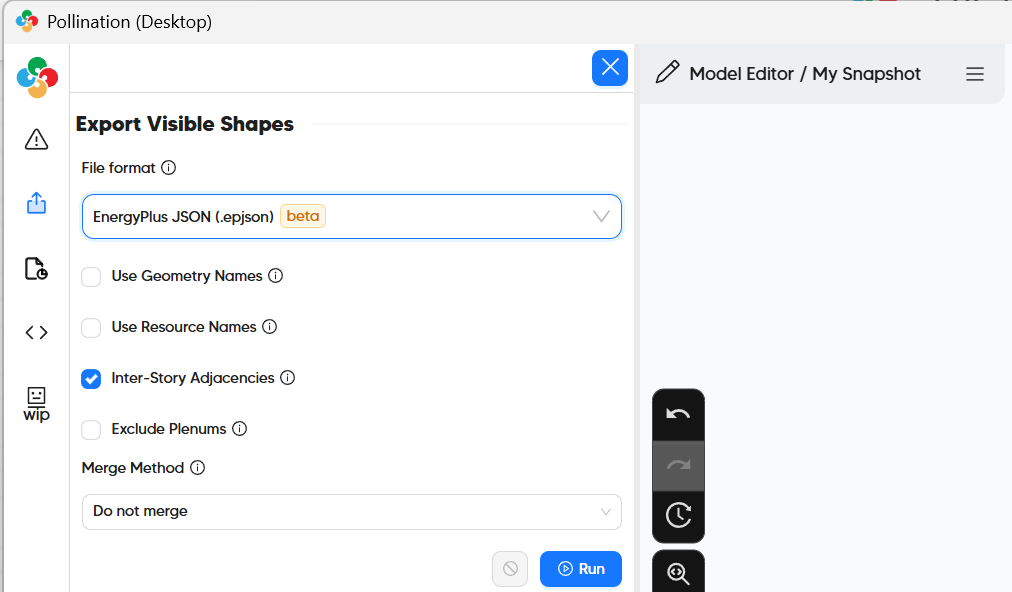
Pollination now officially supports exporting models to the epJSON format!
This was originally requested by EnergyPlus power users and recently championed by the team at Better Building. Looking ahead, epJSON will also serve as the primary export format for the upcoming Trane TRACE™ HVAC Design Software.
New Formatting for Feet and Inches
While at SimBuild, I asked many of our users how we could make their day-to-day workflow even easier and the ability to view values in feet and inches came up frequently. We heard you, and the first iteration is officially here!
A new Format option is now available whenever your units are set to Feet.
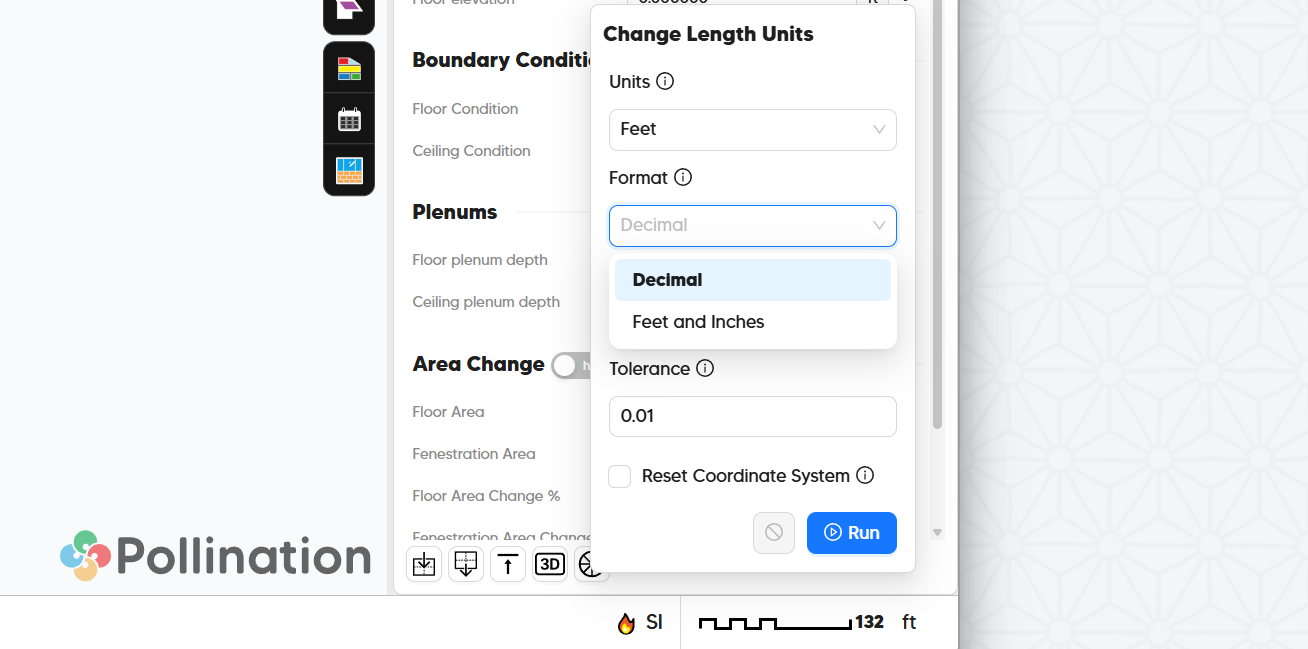
This updates the display preview inside the Model Editor (we’ll be porting this formatting to the Revit connector next). Keep in mind this is purely a styling update for better readability. Under the hood, all values remain stored as decimals to ensure full numerical accuracy.
New Command: Shade to Roof
Until now, you could convert a roof into a shade, but you couldn’t do the reverse. To say the least, a bit of a strange limitation!
Well, not anymore. You can now use the Shade to Roof command to convert shade elements into roof segments instantly.
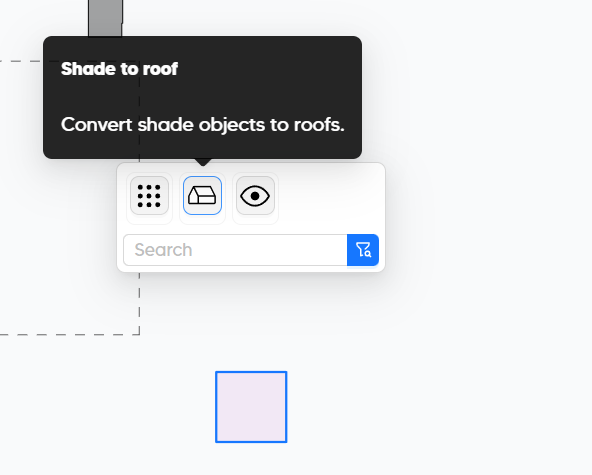
Shout-out to @alterleon for bringing this up!
Bug Fixes
We also addressed two key bugs:
- Shade Attachment Property: Fixed an issue where the
Is Attachedproperty for shades was not setting correctly. Thanks to @crduggin for reporting this bug! - Adaptive Component Panels: Curtain wall panels built with Adaptive Components are now supported, thanks to @franciscocontreras’s sample model.
What’s Next
While the visual upgrades and cleaner UI are nice immediate wins, the real long-term reason we rebuilt the Revit plugin was to give ourselves a chance to experiment with some high-risk, high-reward ideas. Some of them might not work out. But when they do, they could fundamentally transform how fast and effortless preparing energy models can be.
Here is a look at three initiatives we are currently working on, ordered from lowest to highest risk:
Pursuit of Re-Pollinate: TRACE™ 700 Edition
With TRACE™ 700 making a comeback (and remaining available until the new Trane TRACE™ HVAC Design Software is widely adopted) and based on heavy demand from our customers, we’ve decided to make TRACE 700 our first target for exporting full model export: geometry, loads, infiltration, and more.
The main challenge is that TRACE™ 700 doesn’t provide an API or any other formal solution to import data other than geometry. To get around that, we’re combining gbXML for geometry exports with customized Excel spreadsheets for other parameters, leveraging TRACE™ 700’s Component Tree view. We’ve even started exploring .EXP file exports so you can take full advantage of templates.
As part of this push, we’ve improved how Space Types load from Revit and how loads and airflow values are edited in Pollination. More details to come in the near future! If you’re an early adopter, you can already start poking around with these changes under the Room > Program section.
Revit Connector UI Refactor & Optimization
The new Revit Connector UI is a huge step up from the Classic version, but there’s still room for improvement. By working closely with many of you, we’ve pinpointed several areas to streamline. We’ve also identified routine steps we can automate so you don’t have to think about them unless you really want to. We’ll be focusing heavily on this over the next few months.
This is a high-risk initiative. If done incorrectly, it risks putting us in the category of software that makes unnecessary UI changes just for the sake of it. Let’s hope we get it right! 
Exploring a Pollination Assistant
It’s still early days for this one, but we’ve started experimenting with a fresh approach to model editing - one that feels very similar to modern text document editors. Errors and warnings are highlighted automatically as you work, offering smart suggestions with a single click.
It’s still in the experimental stage, but our early tests look promising. Let’s see if we can get this to feel right. For now, just remember the project code name: Buzz! 
Here is a short demo of the first part to highlight the unmatched edges automatically:
We might even release this feature as-is before figuring out the suggestion part.
Thank You!
First of all, thank you for reading this far or even just for scrolling all the way to the bottom!
Second, a huge thank you to everyone who provided feedback on the new release. We truly appreciate it, and we’d love to hear your thoughts on these latest updates. Feel free to leave a comment below, drop us a private message, or email us directly. Whichever works best for you!
Last but not least, thank you to everyone who shares their Pollination experience publicly on LinkedIn and other platforms. It helps us tremendously! I personally read every email, post and comment and try to reply to every single one of them. If I’ve missed one of yours, let me know and I’ll be sure to reach out.
Happy Pollinating!
To save you some time from scrolling all the way up, you can download the latest Revit Plugin here.
